A Centralised Hub for Efficient Asset Management
This platform simplifies users’ workflows by providing all necessary tools in one place, allowing them to efficiently manage their assets, resolve issues, and maintain system performance without unnecessary friction.
To ensure new releases met user needs and improved the overall experience, I used a comprehensive approach that included user interviews, usability testing, competitor analysis, and site analytics review.
By gathering qualitative and quantitative data, I identified pain points, prioritised features, and made data-driven decisions that addressed user feedback. This iterative process ensured the platform continuously aligned with user expectations and provided relevant features.
Using Axure and Figma, I created pixel-perfect prototypes for each new feature, ensuring precise visuals and functionality. This allowed for thorough user testing with realistic interactions, validating design decisions early. The prototypes also facilitated seamless collaboration with product managers and developers, aligning teams and streamlining development. This approach bridged the gap between design and implementation, leading to smoother project delivery and more user-centred features.
I worked closely with the UX team, product management, and developers throughout the product lifecycle to ensure successful feature releases and exceptional user experiences. By fostering strong cross-functional communication and alignment, we created user-centred, technically feasible solutions that met both business and user needs.
Needs: Quick access to technical product details, troubleshooting guides, and support documentation.
Pain Points: Navigating complex interfaces and finding precise information during time-sensitive tasks.
Design Focus: Streamlined search functionality and organised layouts to help engineers find critical resources quickly.
Needs: Simplified tracking of service agreements, renewal dates, and compliance requirements.
Pain Points: Managing multiple contracts efficiently without missing key deadlines.
Design Focus: Intuitive dashboards with clear contract overviews, reminders for renewals, and downloadable reports.
Needs: Access to both product and contract information to assist team members and customers effectively.
Pain Points: Switching between multiple sections to locate relevant data.
Design Focus: Centralised access to relevant tools and cross-referenced data to reduce workflow interruptions.
Customisable Data Tables: Empowering Users with Tailored Solutions
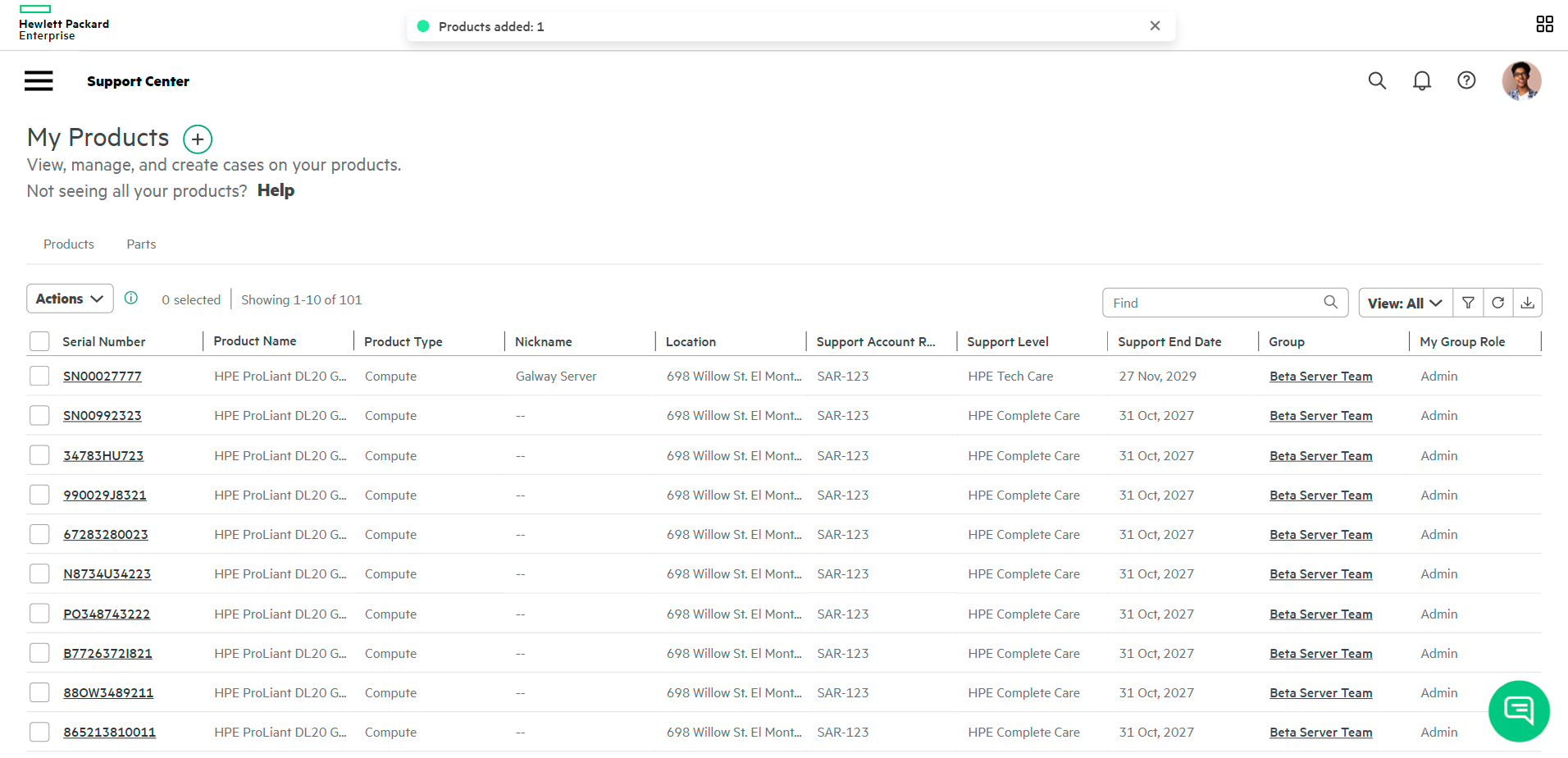
After conducting thorough research, user interviews, and competitor analysis, I identified that the best solution to meet the diverse needs of HPE Support Center users was a customisable data table. Feedback from different user personas revealed varying priorities regarding which data should be displayed upfront:
IT Admins needed quick access to technical specifications and product status.
Contract Managers prioritised contract details like renewal dates and compliance metrics.
Partners required a broad overview with the ability to drill down into specific details.
To address these varied needs, I designed a data table component with comprehensive filtering options and adjustable column settings. Users could easily customize the displayed information to match their specific workflows and priorities. This flexibility ensured that each persona could tailor the experience to their unique requirements, enhancing usability and efficiency across all roles.
Clicking on a product serial number will bring the user to the Product Details page, which contains additional info and resources for that product.
I applied a similar user interface to the My Products page for the My Contracts section of the HPE Support Centre. This ensured a seamless experience, reinforcing design consistency. Users can easily view and manage their HPE support contracts, with the same customisation options as the product management section.
By using the same interface and interaction patterns, users feel familiar with the system, improving usability and reducing the learning curve. This consistency enhances the overall user experience, allowing users to navigate and manage their contracts efficiently, regardless of the section.
To improve transparency and usability, I added a feature that lets users click on a contract ID to view a detailed view of that contract.
This page displays all the contract information and the products covered by it, giving users a clear overview.
This feature makes it easier for users to navigate their contract details and find the information they need, improving the overall experience of the platform.
To ensure a consistent user experience across different HPE Support Centre areas, I created a reusable data table component. This intuitive component allows users to interact with data consistently, regardless of the section.
Users can add, remove, and view more information on items with a consistent interface.
Key features include:
- Customisable columns: Users can sort and adjust columns to display relevant data.
- Advanced filters: Users can tailor the displayed information.
- Saved views: Users can save preferred table views for easy access.
The component is accessible, supporting keyboard navigation, screen reader compatibility, and mobile responsiveness. This ensures all users can interact easily with the platform.
HPE’s platform is well-integrated with tools that allow users to manage their products, contracts, and support cases all in one place. This centralisation provides better accessibility and a more streamline
HPE’s platform is designed with accessibility in mind, supporting keyboard controls, screen readers, and mobile responsiveness. This inclusivity ensures that users, regardless of their needs, can interact with the system efficiently.
HPE offers an exceptional level of customisation for users, especially in features like filtering, sorting, and saving table views. This level of flexibility is beneficial for B2B users who manage complex product and contract data. HPE’s flexibility allows each user to tailor the interface to their needs, which is especially useful for engineers and contract managers.
HPE’s support system excels in providing clear, comprehensive information about products, contracts, and service cases. Their emphasis on an intuitive design and easy-to-navigate interface makes it easier for businesses to find what they need quickly, compared to competitors, which may not offer as cohesive an experience.
Free AI Website Creator